
The Sniper Code Unblocked — Play Free Online
More Shooters games


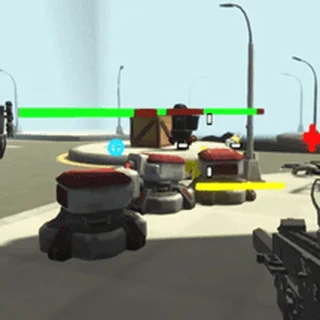





The Sniper Code unblocked: play The Sniper Code online free right here in your browser — no download, no sign-up, works on a school Chromebook.
The Sniper Code brings tactical marksmanship and mission-based puzzle solving directly to your web browser. Instead of mindless run-and-gun combat, each stage places you into high-stakes contract scenarios where precision, patience, and timing dictate whether you succeed or blow your cover. Whether you are eliminating high-profile targets from long range or clearing hostile facilities on foot, every bullet counts toward your overall mission score.
For players visiting Slope Game who want a switch from reflex-heavy endless runners to methodical tactical challenges, The Sniper Code offers a compelling pace. The tension shifts from dodging falling gaps at high speed to carefully lining up crosshairs against moving targets, accounting for sightlines, and taking shots before your mission timer expires.
The game runs directly in any modern desktop browser with HTML5 technology. There are no client downloads, plugins, or registration hurdles required, allowing you to jump straight into active sniper contracts in seconds.
How to play
Controlling your operative requires steady mouse control and quick keyboard inputs:
- Mouse Aim: Move your cursor across the screen to position the sniper reticle or aim your firearm.
- Left Click: Pull the trigger to fire your weapon at the designated target.
- WASD Keys: Move your operative forward, backward, and side-to-side during active tactical movement stages.
- R Key: Reload your magazine when ammunition runs low. Always reload behind cover to avoid getting caught mid-fight.
- Spacebar: Jump over obstacles or navigate elevated ledges.
Click once inside the game frame before starting so your browser captures all keyboard and mouse inputs without window scrolling. Each mission begins with specific briefing objectives, detailing target identities and mission constraints such as bullet limits or time countdowns.
Mission strategy and tips
Scoring high ratings and completing contracts cleanly requires calculated decisions rather than rushed shooting:
- Identify targets before firing: Check the mission briefing thoroughly. Shooting the wrong target or alerting civilian bystanders results in instant mission failure.
- Prioritize lethal headshots: Aim for the head whenever possible to neutralize guards in a single shot before they can raise alarms or return fire.
- Manage your reload timing: Never let your magazine run completely empty in the middle of a gunfight. Tap R between hostile waves or when retreating behind physical cover.
- Watch patrol patterns: Enemies follow set walking routes. Wait until an isolated sentry turns away from his squad before pulling the trigger to keep your presence hidden.
More action games on Slope Game
If you enjoy testing your reflexes and tactical execution, explore other popular browser titles across the site. Players who like fast-paced spatial awareness can jump into Slope and Slope 3 for exhilarating downhill speed runs. If you prefer high-speed obstacle navigation and timing challenges, Tunnel Rush and Super Tunnel Rush deliver rapid visual thrills. For physics-based platforming and momentum control, give Stickman Hook and Red Ball 4 a spin between sniper missions.
Questions about The Sniper Code
Is The Sniper Code unblocked at school?
The Sniper Code runs in an ordinary browser tab from playslope.io, with nothing to download or install, so it plays on most school Chromebooks and work computers. If a network filter blocks the site, only that network's administrator can change it.
What are the controls for The Sniper Code?
Aim with the mouse and left-click to fire. Use the WASD keys to move your operative, press R to reload your weapon, and press Space to jump over obstacles.
Is The Sniper Code free to play in the browser?
Yes, The Sniper Code is completely free to play directly in your web browser with no download, installation, or account setup required.
What should I do if the game does not register keyboard inputs?
Click once inside the game frame with your mouse so the browser focuses on the canvas and captures your keyboard commands properly.
Can I play The Sniper Code on a Chromebook or laptop?
Yes, the HTML5 version runs smoothly in standard desktop browsers on laptops and Chromebooks with keyboard and mouse controls.
More games
 Slope City
 Super Tunnel Rush
 Marble Run 3D
 Rolling Jump
 Red Ball 4
 Tunnel Rush
 Stickman Hook
 Dreadhead Parkour
 Dino Run
 Doodle Jump
 Crazy Runner
 Icy Purple Head 3
 G Switch
 Vex 3
Vex 3 Skiing Fred
 Running Fred
 Temple of Boom
 3D Arena Racing
 Eggy Car
 Flying Car Simulator
 Drive Mad
 Wheely 7
 Stacktris
 99 Balls
 World's Hardest Game
 Cookie Clicker
 Piano Tiles